一、前言
今天小編帶大家一起整合一下easyExcel?,之所以用這個(gè),是因?yàn)閑asyExcel?性能比較好,不會(huì)報(bào)OOM!
市面上常見(jiàn)的導(dǎo)入導(dǎo)出Excel分為三種:
hutool和easyExcel?都是對(duì)poi?的封裝,使用起來(lái)更加方便!
二、導(dǎo)入依賴(lài)
小編這里是3.0.X版本的,版本不同可能導(dǎo)致部分有出入,如果大家版本是3.1.X,可以去官方文檔看看有不一樣的!
官方文檔:https://easyexcel.opensource.alibaba.com/
<dependency>
    <groupId>com.alibaba</groupId>
    <artifactId>easyexcel</artifactId>
    <version>3.0.5</version>
</dependency>
三、實(shí)體類(lèi)
這里可以自帶的轉(zhuǎn)換器:
- @DateTimeFormat("yyyy年MM月dd日HH時(shí)mm分ss秒")
- LocalDateTimeStringConverter
或者自定義轉(zhuǎn)化器:實(shí)現(xiàn):implements Converter<T>。
具體文檔:官方文檔:https://easyexcel.opensource.alibaba.com/docs/3.0.x/quickstart/read#%E6%97%A5%E6%9C%9F%E6%95%B0%E5%AD%97%E6%88%96%E8%80%85%E8%87%AA%E5%AE%9A%E4%B9%89%E6%A0%BC%E5%BC%8F%E8%BD%AC%E6%8D%A2
@ExcelProperty參數(shù)注意:
這里不建議 index 和 name 同時(shí)用,要么一個(gè)對(duì)象只用index,要么一個(gè)對(duì)象只用name去匹配。
用名字去匹配,這里需要注意,如果名字重復(fù),會(huì)導(dǎo)致只有一個(gè)字段讀取到數(shù)據(jù)。
/**
 * @author wangzhenjun
 * @date 2022/12/2 15:52
 */
@Data
public class Test {

    @TableId
    private Integer id;
    @ExcelProperty(index = 0)
    private String name;
    @ExcelProperty(index = 1)
    private Integer age;
    @ExcelProperty(index = 2,converter = LocalDateTimeStringConverter.class)
    private LocalDateTime time;
}
四、編寫(xiě)監(jiān)聽(tīng)器
注意點(diǎn):這個(gè)監(jiān)聽(tīng)器一定不要是單例的,被spring管理默認(rèn)為單例,如果要使用?@Component?,一定要加上:@Scope("prototype")?,這樣在創(chuàng)建完后spring不會(huì)進(jìn)行管理,每次都會(huì)是新bean!不加?@Component?在導(dǎo)入時(shí)要進(jìn)行new ImportDataListener!小編這里不想new了直接這樣寫(xiě)!!如果不想這樣,可以使用構(gòu)造器set進(jìn)行使用!BATCH_COUNT?:數(shù)據(jù)閾值,超過(guò)了就會(huì)清理list,在之前可以進(jìn)行保存到數(shù)據(jù)庫(kù)中,方便內(nèi)存回收,防治OOM!這里保存到數(shù)據(jù)庫(kù)中一般使用?批量保存,不要解析到一行就去保存數(shù)據(jù)庫(kù)中,這樣數(shù)據(jù)量大會(huì)給數(shù)據(jù)庫(kù)增加IO,導(dǎo)致掛掉!這里小編使用ServiceImpl的saveBatch()方法,也可以自己寫(xiě)一下,像小編這樣寫(xiě),會(huì)出現(xiàn)循環(huán)依賴(lài),加上@Lazy就行!
/**
 * @author wangzhenjun
 * @date 2022/12/2 15:38
 */
@Slf4j
@Component
// 每次bean都是新的,不要單例
@Scope("prototype")
public class ImportDataListener implements ReadListener<Test> {

    @Autowired
    @Lazy
    private TestService testService;

    /**
     * 每隔5條存儲(chǔ)數(shù)據(jù)庫(kù),實(shí)際使用中可以100條,然后清理list ,方便內(nèi)存回收
     */
    private static final int BATCH_COUNT = 100;
    /**
     * 緩存的數(shù)據(jù)
     */
    private List<Test> importExcelDataList = ListUtils.newArrayListWithExpectedSize(BATCH_COUNT);


    /**
     * 這個(gè)每一條數(shù)據(jù)解析都會(huì)來(lái)調(diào)用
     *
     * @param data    one row value. Is is same as {@link AnalysisContext#readRowHolder()}
     * @param context
     */
    @Override
    public void invoke(Test data, AnalysisContext context) {
        log.info("解析到一條數(shù)據(jù):{}", JSON.toJSONString(data));
        importExcelDataList.add(data);
        // 達(dá)到BATCH_COUNT了,需要去存儲(chǔ)一次數(shù)據(jù)庫(kù),防止數(shù)據(jù)幾萬(wàn)條數(shù)據(jù)在內(nèi)存,容易OOM
        if (importExcelDataList.size() >= BATCH_COUNT) {
            saveData();
            // 存儲(chǔ)完成清理 list
            importExcelDataList = ListUtils.newArrayListWithExpectedSize(BATCH_COUNT);
        }
    }

    /**
     * 所有數(shù)據(jù)解析完成了 都會(huì)來(lái)調(diào)用
     *
     * @param context
     */
    @Override
    public void doAfterAllAnalysed(AnalysisContext context) {
        // 這里也要保存數(shù)據(jù),確保最后遺留的數(shù)據(jù)也存儲(chǔ)到數(shù)據(jù)庫(kù)
        saveData();
        log.info("所有數(shù)據(jù)解析完成!");
    }

    /**
     * 加上存儲(chǔ)數(shù)據(jù)庫(kù)
     */
    private void saveData() {
        log.info("{}條數(shù)據(jù),開(kāi)始存儲(chǔ)數(shù)據(jù)庫(kù)!", importExcelDataList.size());
        testService.saveBatch(importExcelDataList);
        log.info("存儲(chǔ)數(shù)據(jù)庫(kù)成功!");
    }
}
五、Controller
/**
 * @author wangzhenjun
 * @date 2022/10/26 16:51
 */
@Slf4j
@RestController
@RequestMapping("/test")
public class TestController {

    @Autowired
    private TestService testService;

    @PostMapping("/import")
    public Result importExcel(@RequestBody MultipartFile multipartFile){
        testService.importExcel(multipartFile);
        return Result.success("ok");
    }
}
六、Service
/**
 * @author wangzhenjun
 * @date 2022/10/26 16:55
 */
public interface TestService extends IService<Test> {
    void importExcel(MultipartFile multipartFile);
}
七、ServiceImpl
/**
 * @author wangzhenjun
 * @date 2022/10/26 16:56
 */
@Service
public class TestServiceImpl extends ServiceImpl<TestDbMapper, Test> implements TestService{

    @Autowired
    private ImportDataListener importDataListener;

    @SneakyThrows
    @Override
    public void importExcel(MultipartFile multipartFile) {
        InputStream inputStream = multipartFile.getInputStream();
        // 這里 需要指定讀用哪個(gè)class去讀,然后讀取第一個(gè)sheet 文件流會(huì)自動(dòng)關(guān)閉
        EasyExcel.read(inputStream, Test.class, importDataListener).sheet().doRead();
    }
}
八、Mapper
/**
 * @author wangzhenjun
 * @date 2022/10/26 17:07
 */
public interface TestDbMapper extends BaseMapper<Test> {
}
九、測(cè)試
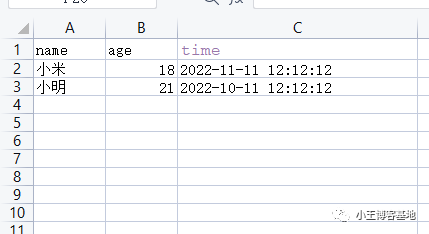
準(zhǔn)備Excel數(shù)據(jù):
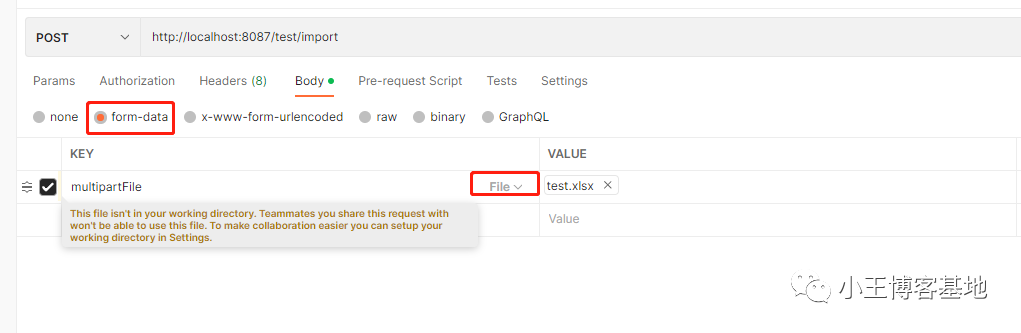
postman上傳:
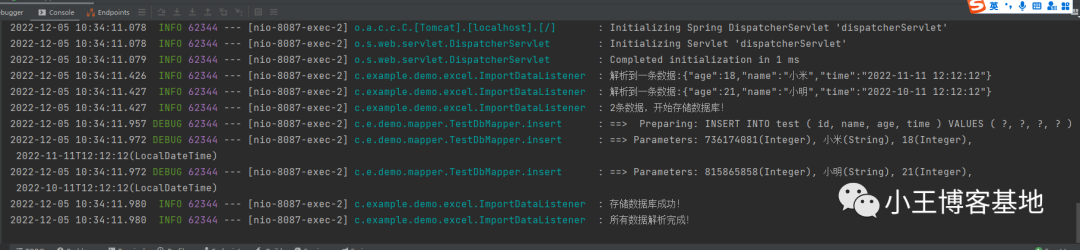
控制臺(tái)打印:
數(shù)據(jù)庫(kù)查看:
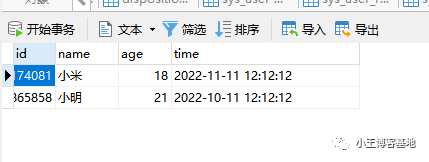
完美搞定!!
十、總結(jié)
這樣就完成了easyExcel批量導(dǎo)入Excel到數(shù)據(jù)庫(kù),還是有很多要注意的點(diǎn):
- 自定義轉(zhuǎn)換器
- 監(jiān)聽(tīng)器不要單例
- 保存數(shù)據(jù)庫(kù)采用批量
- 版本差距